You're looking at example data, not your results.
Your progress report (PDF)
Press 📄 Download PDF report to save a branded summary of your progress. It includes your score trend, strongest and weakest question types, speaking fluency and every session. It's great for keeping a record, or for sharing with a teacher or tutor.
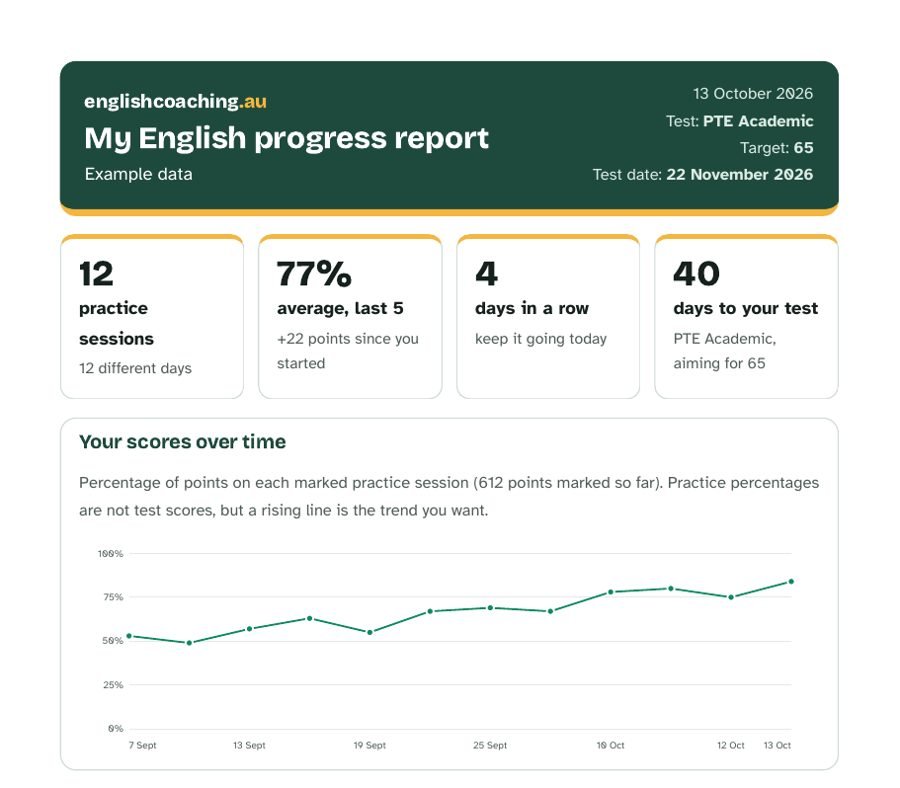
How progress tracking works
- Nothing leaves your device. Results are stored in your browser's local storage. We don't have a database, accounts or a copy of your results.
- What's saved: the date, which practice you did, your points, points by question type, and speaking timings (start delay and pauses). Never your answers, your voice or your recordings.
- What counts: every marked activity: mock tests and practice for PTE, IELTS and OET, daily practice, quizzes, Everyday English lessons, flashcard sessions, speaking tests and essays marked by our writing checkers.
- Limits: up to 1,000 activities are kept on this device. Clearing browser data or private windows erase them, and Safari can delete them after 7 days without a visit, so download your report regularly.
- Your control: tracking is on by default; turn it off any time, download a copy, or delete everything with one button.
How to use it well
- Set your test, score and date so the countdown keeps you honest.
- Do daily practice for a steady stream of data points, and a full mock test every week or two.
- Check the weakest question types and spend most of your time there. They usually lift your overall score fastest.
- Watch the speaking chart. Start within 1–2 seconds and keep your longest pause under 3 seconds.
Unofficial practice. We wrote these questions to match the official PTE Academic task types and timings. They are not real exam questions, and points shown are practice feedback, not a PTE score. For an official estimate, use Pearson's scored practice tests.
Frequently asked questions
Do I need an account?
No. Your results are saved in your own browser on this device. We never receive them, and there's no sign-up or password.
Can I see my progress on another phone or computer?
Yes. Press 'Back up' on this device, then 'Restore a backup' on the other one. The backup file stays with you. For a nice-looking summary to keep or share, use 'Download PDF report'.
Why did my progress disappear?
Clearing your browser data, using a private window or switching browsers removes or hides on-device data. Download a copy now and then if you want a backup.
Is my practice percentage my real PTE score?
No. It's the share of points you got on our practice questions. It's useful for tracking your trend, but only the official test gives a real score.